Welcome to Furry Network's Support & Feedback Forum!
You can vote for improvements you'd like to see, suggest your own, and report bugs here. With your help, we'll make Furry Network even better!

 Why am I seeing submissions to artists I am not even following?
I'm following 5 artists, why I am seeing other artists' art sometimes when I click "Activity" to see the latest from who I am following?

 "Comment box" below public submissions.
Reply or comment on submissions before viewing larger version.
Key points
It saves a step.
I can already favorite and like submissions before viewing full version.
Increases likelihood of audience engagement.
Nice.

[Upload] Artwork - Cannot delete image
I have an image that is currently in my unlisted pictures, since I had run into an error in uploading the picture. When I go to manage my artwork, and edit this unlisted picture, I cannot delete it from my account. The trash can icon is not present when I scroll down the side bar for the picture information, which prevents me from clearing the image.

Import from FA function doesn't work
It's just returning with a login error, so I'm not sure what to do >>

Return the options to promote and remove individual post in inbox, like it was before for a large image filter.
There is two filters how you can view submissions in inbox. Filters with small and big images. Filter with small images has such functions like promote, like, delete, so everything is fine. But with big images, there is only one option - like. Why were other options removed, whats a point? Please return those options to the big images filter! It won't heart to have same options on both filters, like it was before. Maybe it's a bug, I don't know.

"Featured" instead of "Most Popular"
Every time i come to the site, i see the same art being shown in the "most popular' section. i would like to suggest that art be "featured" as oppose to being "Most popular" this will give smaller accounts more of a chance to have there work acknowledged. It could be based on likes per week versus total likes.

Multimedia broken and unplayable, also plays as a music, but no video
I've encountered this recently when I was watching on some SL multimedia "stuff" :D
HERE the broken: https://beta.furrynetwork.com/multimedia/5464/trainer-vs-rocket/
It says "No video with supported format and MIME type found" and download gives some XML error (connection error, corrupted file and etc...)
HERE the "music player" after download plays both the sound and the video (as a normal mp4): https://beta.furrynetwork.com/vargrvanguard/multimedia/collections/24091/?viewId=3374&viewType=multimedia
Seems like a recent and new bug

Improve moderation
I submitted a ticket regarding misleading tags and the moderator came up with an excuse to not take action, if this was FA, posts with misleading tags would get taken down ASAP, and when searching the exact same tags on FA, not a single post is misleading, somebody better teach these mods a lesson or FA will run Furry Network out of business

Importer compresses original size image
After doing some comparisons I've found the furaffinity importer compresses the original image. When uploaded manually this does not appear to be the case. While the submission view looks just as bad, especially with the example because of the gradients, but that's a different issue.
The images sourced from the download link
Furaffinity(original):
Imported:
Uploaded myself:

Headings Markdown not working
Hello,
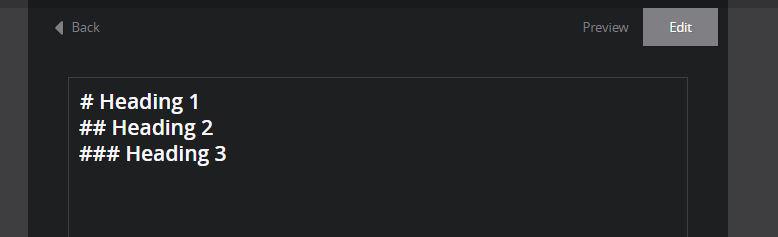
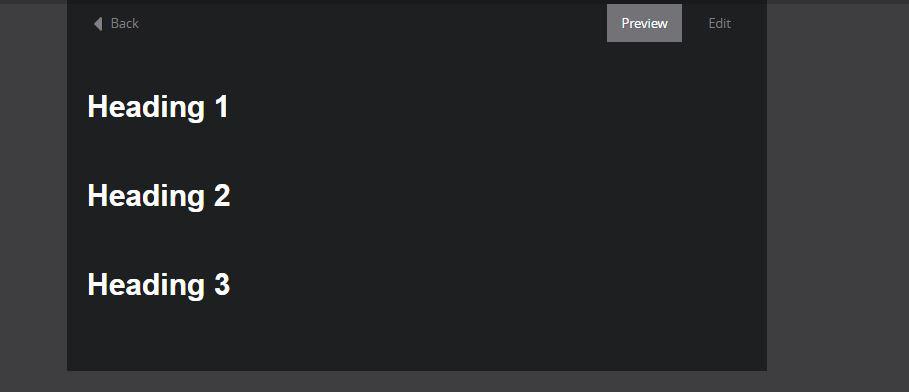
I was posting one of my stories, today, and I wanted to use the headings markdowns for my title, but noticed that no matter if I was doing "#' , "##" or "###" in front of my title, the same style would come out, the Heading 1 style.
What I wrote :
The result :
What is shown in the markdowns syntax list, at the bottom of the submission content:
I am using Google Chrome, on Windows 7. In case that helps
Customer support service by UserEcho